Lately I've had multiple friends (and myself) experience some job losses. I've heard the average lifespan of a job is three years, so it is likely at any one time there will be someone you know that is unemployed. I decided to share what worked for me to change that.
When you first lose your job, it's like someone kicked you in the head. You don't feel like doing ANYTHING. Take it easy for a day, or two, or maybe even three. Before you start that, decide how many days you are going to just take it easy. Write it on your calendar and stick to it! You may also want to take one of these days and take care of the stuff you didn't have time to do when you were working a job.
One of the top things on the list of stuff to do: file for unemployment if you are eligible. Don't treat the unemployment like welfare. Treat it like the government is paying you to do the best job you can of finding another job.
Two things to keep in mind as you look for a job: everyone who finds out you are unemployed is going to have their idea of how you should spend your time. YOU DECIDE what the best use of your time is. Also, momentum is powerful. Make sure it is on your side. If you sit there and do nothing after the date your wrote to start job hunting, you will not feel like doing anything.
Day 1 of your job hunt should be writing your resume. Have one main "template" resume and then modify it to fit each job you apply for.
Now, decide how fast you want to get a new job. The faster you go, the more momentum is on your side. I shot for applying for two jobs or go to one job interview a day. If you think you have all day to apply for two jobs, you will most likely end up applying for a couple dumpy jobs online just before you head for bed (if you do it at all). The secret I've found: if there's something you really want done, make it a goal to get it done by lunch.
So, apply for two jobs by lunch, then eat lunch, then do something fun for a bit. After that if there's something else you need to get done for the day, try to get it done by supper. Then you can enjoy your evening with friends and/or family.
The wonderful thing about the "Do it by lunchtime" principal: it can apply to almost anything that would want to do that can be done in a few hours. Repeat until your goal is accomplished.
Monday, September 10, 2007

Monday, August 6, 2007
Goals and Projects
In the past, I've read multiple books about time management and organization. Among them, it seems that two that seem more popular and better than the rest. They are "The Seven Habits of Highly Effective People" by Stephen Covey and "Getting Things Done" by David Allen.
Each one has a completely different approach to planning. Seven Habits advocates "Begin with the end in mind." Think about what you want people you care about to say about you at your funeral (as morbid as that sounds) and figure out what it would take to make that happen. The things that would make this happen are what you should focus on every day and then everything else fits in around it. This would include things like being the best husband possible to your wife, leaving the world a better place, etc. etc.
The GTD approach to planning is anything that requires more than one action is a project. Every project goes on a list, and then you break it up into actions, and then you do the things on your list.
I'd read GTD twice and I really like the idea but I had one issue with the project planning way of going about things. It seemed to me that if you follow this method, you end up having a bunch of projects and will spend your life just doing stuff that probably won't matter.
Then I borrowed a copy of the "Getting Things Done - Fast" audio program (no longer available) and realized I'd completely missed one thing and missed most of one other thing.
First off - the thing I missed most of. GTD advocates planning on different levels. There is the "runway level" (projects like go get the car fixed, fix the plumbing, etc) all the way up to the "50,000 feet level" that is find your life purpose and make it happen. To have a successful life, you need to operate on all levels.
And the thing I completely missed when I read the book. David Allen says that one of the first steps in planning a project is to define what the project will look like if it is wildly successful and also how to know if the project is done.
If you think about it, this sounds like a goal to me! A goal is a defined outcome. I want to be debt free by Christmas, I want to get my weight down to 180 pounds, I want to drive X amount of traffic to this blog, etc, etc. These are what many people would call goals.
Now to turn any of those goals into a project, just figure out what steps you would need to accomplish to make this happen.
Each one has a completely different approach to planning. Seven Habits advocates "Begin with the end in mind." Think about what you want people you care about to say about you at your funeral (as morbid as that sounds) and figure out what it would take to make that happen. The things that would make this happen are what you should focus on every day and then everything else fits in around it. This would include things like being the best husband possible to your wife, leaving the world a better place, etc. etc.
The GTD approach to planning is anything that requires more than one action is a project. Every project goes on a list, and then you break it up into actions, and then you do the things on your list.
I'd read GTD twice and I really like the idea but I had one issue with the project planning way of going about things. It seemed to me that if you follow this method, you end up having a bunch of projects and will spend your life just doing stuff that probably won't matter.
Then I borrowed a copy of the "Getting Things Done - Fast" audio program (no longer available) and realized I'd completely missed one thing and missed most of one other thing.
First off - the thing I missed most of. GTD advocates planning on different levels. There is the "runway level" (projects like go get the car fixed, fix the plumbing, etc) all the way up to the "50,000 feet level" that is find your life purpose and make it happen. To have a successful life, you need to operate on all levels.
And the thing I completely missed when I read the book. David Allen says that one of the first steps in planning a project is to define what the project will look like if it is wildly successful and also how to know if the project is done.
If you think about it, this sounds like a goal to me! A goal is a defined outcome. I want to be debt free by Christmas, I want to get my weight down to 180 pounds, I want to drive X amount of traffic to this blog, etc, etc. These are what many people would call goals.
Now to turn any of those goals into a project, just figure out what steps you would need to accomplish to make this happen.
Saturday, July 28, 2007
easy way to handle warranty receipts
I was going through my file cabinet a couple days ago tossing old papers I no longer need. Among other things, I found a folder labeled "Warranty - Hardware" for computer hardware I've purchased. On some of them, the ink was so faded I could not longer read what the receipt was for.
I came up with an idea for keeping track of receipts. Instead of putting them in folders based on what the item is or when it was purchased, why not put them in folders based on when the warranty expires? So I'd have "Warranty - 2007", "Warranty - 2008" etc and "Warranty - Lifetime." At the end of 2007, I'd toss all the receipts I don't have a good reason to keep in the shredder or recycle bin. That would also be a good time to go through the "Warranty - Lifetime" folder and toss any receipts for items I no longer own.
This system only leaves one problem: how am I going to be able to quickly locate the receipts if I need them? Organized by warranty expiration date isn't exactly intuitive. I think a good way to handle this would be to keep a list of what I bought either in a notebook, spreadsheet, or any kind of program that can handle making lists. I'd track purchase date, purchase amount, warranty expiration date, what I bought, and of course where I bought it. This list could also serve as a inventory of what you own.
I've started implementing a solution in the program Journler (Mac only) - Windows users may want to check out the program EverNote. I just have a folder called "receipts" and dump all this info in there. If you have a good scanner, you may even consider just keeping PDF's of all your receipts.
Hopefully this is helpful to someone.
I came up with an idea for keeping track of receipts. Instead of putting them in folders based on what the item is or when it was purchased, why not put them in folders based on when the warranty expires? So I'd have "Warranty - 2007", "Warranty - 2008" etc and "Warranty - Lifetime." At the end of 2007, I'd toss all the receipts I don't have a good reason to keep in the shredder or recycle bin. That would also be a good time to go through the "Warranty - Lifetime" folder and toss any receipts for items I no longer own.
This system only leaves one problem: how am I going to be able to quickly locate the receipts if I need them? Organized by warranty expiration date isn't exactly intuitive. I think a good way to handle this would be to keep a list of what I bought either in a notebook, spreadsheet, or any kind of program that can handle making lists. I'd track purchase date, purchase amount, warranty expiration date, what I bought, and of course where I bought it. This list could also serve as a inventory of what you own.
I've started implementing a solution in the program Journler (Mac only) - Windows users may want to check out the program EverNote. I just have a folder called "receipts" and dump all this info in there. If you have a good scanner, you may even consider just keeping PDF's of all your receipts.
Hopefully this is helpful to someone.
Thursday, July 12, 2007
a taste of the low information diet
I finished reading the wonderful book The Four Hour Workweek not too long ago.
Nearly everything in the book is divided into one of three categories: time management, how to own a business without it owning you, and how to make the first two things lead into traveling or doing whatever it is you enjoy doing in life.
Some of the time management stuff was just common sense, but it also included some parts that are a different way of looking at things. One such section was the part about "The Low Information Diet." The basic idea is don't read, watch, listen to, or otherwise consume information unless it is really important or something you can take action on in the near future. There are some very clear cut steps to reducing the biggest attention stealer in the modern office environment: email. The author suggests cutting down to checking only twice a day, then once a day, and then cut back as far as you can without causing major trouble. A note from personal experience here: if you're going to try this at work, let your boss know BEFORE you cut back on your email. And also let anyone who this may impact know that this will only be on a trial basis.
A couple nights ago, I got a wonderful taste of how it feels to be on the low information diet. After I get home I normally eat supper, go for a walk, and then read all my RSS feeds, email, and then work on my computer. That night, I came home, went for a walk, played video games a bit, watched a movie with my wife and then realized it was a bit past 11 PM. Normally, I go to bed between 11 and midnight. I was tempted to head to the computer to check my email and see if I had any new news in my RSS reader. I decided to just head for bed.
I woke up feeling oddly wonderful.
I'm not talking about the "I got 15 minutes more sleep than I usually do" wonderful. It was more like "I slept better than I have in weeks" wonderful. It's really strange being a computer geek and feeling that good about *NOT* using the computer in the evening. I wonder why that happened? Less junk floating around in my head right before bed maybe? I'll have to try to duplicate that experience more often.
And now for the irony of this blog post: it is 11:27 PM (Eastern Time), I've got to go to work tomorrow and I'm blogging. Good night everyone.
Nearly everything in the book is divided into one of three categories: time management, how to own a business without it owning you, and how to make the first two things lead into traveling or doing whatever it is you enjoy doing in life.
Some of the time management stuff was just common sense, but it also included some parts that are a different way of looking at things. One such section was the part about "The Low Information Diet." The basic idea is don't read, watch, listen to, or otherwise consume information unless it is really important or something you can take action on in the near future. There are some very clear cut steps to reducing the biggest attention stealer in the modern office environment: email. The author suggests cutting down to checking only twice a day, then once a day, and then cut back as far as you can without causing major trouble. A note from personal experience here: if you're going to try this at work, let your boss know BEFORE you cut back on your email. And also let anyone who this may impact know that this will only be on a trial basis.
A couple nights ago, I got a wonderful taste of how it feels to be on the low information diet. After I get home I normally eat supper, go for a walk, and then read all my RSS feeds, email, and then work on my computer. That night, I came home, went for a walk, played video games a bit, watched a movie with my wife and then realized it was a bit past 11 PM. Normally, I go to bed between 11 and midnight. I was tempted to head to the computer to check my email and see if I had any new news in my RSS reader. I decided to just head for bed.
I woke up feeling oddly wonderful.
I'm not talking about the "I got 15 minutes more sleep than I usually do" wonderful. It was more like "I slept better than I have in weeks" wonderful. It's really strange being a computer geek and feeling that good about *NOT* using the computer in the evening. I wonder why that happened? Less junk floating around in my head right before bed maybe? I'll have to try to duplicate that experience more often.
And now for the irony of this blog post: it is 11:27 PM (Eastern Time), I've got to go to work tomorrow and I'm blogging. Good night everyone.
Sunday, April 22, 2007
Using Delicious Library to avoid library late fees
I've come up with a rather simple idea to use the wonderful Mac program Delicious Library to help me track library books I've checked out and help avoid (or at least reduce) late fees.
Delicious Monster allows you to track books, video games, music, and movies you have loaned out to people. In the Apple Address Book, I have an entry for myself. When I check a book out from the library, I add it to my Delicious Library. I then loan the book out to myself with a due date of, you guessed it, the due date.
Due items show up in two places: Delicious Library and iCal.
This trick should be usable on just about any similar program that has the ability to track things that have been loaned out.
It would be nice if Delicious Library 2.0 would have the built-in ability to track books borrowed as well as book lent out.
Delicious Monster allows you to track books, video games, music, and movies you have loaned out to people. In the Apple Address Book, I have an entry for myself. When I check a book out from the library, I add it to my Delicious Library. I then loan the book out to myself with a due date of, you guessed it, the due date.
Due items show up in two places: Delicious Library and iCal.
This trick should be usable on just about any similar program that has the ability to track things that have been loaned out.
It would be nice if Delicious Library 2.0 would have the built-in ability to track books borrowed as well as book lent out.
Monday, April 9, 2007
AHA! moment with Circa notebooks
It has taken over a month using Circa and Rollabind notebooks, but I've stumbled across a feature that Levenger Circa and Rollabind notebooks provide that I find truly powerful. In the past, I've tried to keep everything in my planner. This includes calendar, contacts, todo lists, ideas, notes on books, meeting notes and any other little bit of information I write in my planner.
If I keep all that stuff in my planner, it quickly becomes a pretty full planner. So what to do? I would take all the old pages out and put them in a yearly archival binder. I don't believe I've ever lost an idea, but I don't believe I've ever went back to do anything with an idea I wrote down over a month ago.
Enter the Circa notebooks... I have a section for Creative writings, a section for notes on books I've read along with books I want to read.
Once I'm running low on room in my planner, I can take these pages out and put it in my "Creative" notebook. And if I have enough ideas or notes about books, I could put those each in their own notebook. The whole system grows organically and I can assign individual notebook(s) to a topic. This doesn't require a bunch of bulky binders, just a few rings and notebook covers.
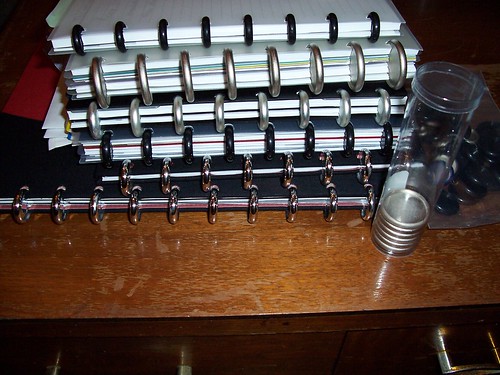
If I keep all that stuff in my planner, it quickly becomes a pretty full planner. So what to do? I would take all the old pages out and put them in a yearly archival binder. I don't believe I've ever lost an idea, but I don't believe I've ever went back to do anything with an idea I wrote down over a month ago.
Enter the Circa notebooks... I have a section for Creative writings, a section for notes on books I've read along with books I want to read.
Once I'm running low on room in my planner, I can take these pages out and put it in my "Creative" notebook. And if I have enough ideas or notes about books, I could put those each in their own notebook. The whole system grows organically and I can assign individual notebook(s) to a topic. This doesn't require a bunch of bulky binders, just a few rings and notebook covers.
Sunday, March 4, 2007
abridged history of a planner geek
I feel I should give a brief history of my experience with planners so anyone who reads about my current system (when I post about it) will know how I got where I am.
For a while, all I used were pocket calendars - back before I was busy. Then I started doing things and decided I needed a planner. My first planner was a Monarch sized Franklin Covey. There were a couple reasons I decided on Monarch size. I could take any page, use the Franklin Covey hole punch, and toss the page in. It was so big I couldn't lose it, and expensive enough I would feel awful if I did. Yes, I remember actually thinking that.
I believe it was the cheapest they had in that size at the time - it was nylon. It was blue. It had TWO pen loops inside. It was huge. I bought it as some kind of bundle. It came with 5 numbered tabs, a "goals" tab, "finances" tab, "key information" tab, 26 address book pages with tabs, 2 pages per month calendar with tabs for the month, and 2 pages per day planning pages. I kept the current week and the next four weeks in there along with the whole year's monthly pages. It didn't take long for me to realize I was not THAT busy. On really busy days I had 6 - 8 lines of writing. 2 - 4 was more normal. I switched to two pages per week planning pages. Also as part of the bundle, I got the archival binder. That was great for keeping extra blank pages in the front, and old used calendar pages in the back.
I like to think my use of the planner was not anything overly complicated. I used the calendar pages to write upcoming events, meetings, and things that absolutely had to be done by a certain date. I had goals written in the goals section, important info in the other sections where they belonged. In the 5 numbered tabs, I had: ideas, notes, directions, favorite quotes, and an "Information Record" section. I used these Franklin Covey forms to keep track of ongoing contact with different people, such as any issues I was in contact with M/I Homes during the construction of my house. This was invaluable for tracking who I talked to, when, and what they said.
After a while (a year and a half or so) I found I wasn't carrying the planner with me as much because it was so big, bulky and heavy. I decided to downgrade to a Classic size planner. At the time, I thought it would be a great idea to keep my address book electronically (since email is my primary form of contact) and keep it synced up with a Palm Pilot. So I got a planner with a PDA clip.
I used the same basic system with the Classic planner. The only difference was anything that I needed to take with my was folded in half and put in the pocket in the front of the planner. One day, I dropped my Palm Pilot 3 feet onto carpet. It just happened to land just right (or just wrong) on the edge. It broke the input area of the screen, rendering it useless for data entry! I decided then and there that until there is a PDA I can drop without it breaking, I probably shouldn't mess with them. Plus, I was mostly just using it for games. I removed the PDA clip from my planner to make room for more pages.
Fast forward a few more months. I once more started getting the "I'm not carrying this because it is too heavy" feeling. I decided to try out Franklin Covey's Compass system in pocket size. It looks a little like a checkbook cover with a pen loop, an address book insert on one side, a wire-bound calendar on the other. There is a pocket behind the calendar for a notebook (sold separately). The problem with this thing is it was the worst of both worlds: too big to comfortably fit in my pocket, too small to really give you much room for writing. Also, you can't really add pages except for adding a new notebook, address book, or calendar.
Once I got a little more money, I went out and bought the thinnest Franklin Covey Classic size zipper binder I could find. It turned out to be at Target.
I used that for a couple months. Then I got a new job and started having much more stuff to keep track of. I'd also read the book "Getting Things Done" by David Allen and decided the best way to keep track of stuff for work would be to have my projects listed one project per page and each page listed the details of all that project.
I paid a visit to diyplanner.com to see if there was a solution to my problem of wanting to keep all my stuff in one notebook AND tracking everything I need to track without getting a super size Franklin planner. Then, it happened. The review of the Circa notebook system showed up on that site. Why had I not heard of this or thought of this before? A notebook with rings that are all equal distant apart, so you could take a page from a smaller notebook and put it in a bigger notebook. Infinite customizability, expandability, and they look really, really cool!
The clincher here... The article mentioned a man who had used the same planner for 50 years. I want that. I'm tired of getting sick of one size of planner and having to buy new stuff every time I want to try something different. This solves that problem. I can use the same system and the only time I'll have to buy new stuff is if I go to a smaller size. And then the new stuff will still work with my old stuff.
I want to be able to use the same gear for at least a few years and not have to buy anything besides refills such as calendar and address book pages. I can't imagine doing that unless I have a planner that is expandable, customizable, and well made. The Circa notebooks seem to cover that.
More on my current system, coming soon.
For a while, all I used were pocket calendars - back before I was busy. Then I started doing things and decided I needed a planner. My first planner was a Monarch sized Franklin Covey. There were a couple reasons I decided on Monarch size. I could take any page, use the Franklin Covey hole punch, and toss the page in. It was so big I couldn't lose it, and expensive enough I would feel awful if I did. Yes, I remember actually thinking that.
I believe it was the cheapest they had in that size at the time - it was nylon. It was blue. It had TWO pen loops inside. It was huge. I bought it as some kind of bundle. It came with 5 numbered tabs, a "goals" tab, "finances" tab, "key information" tab, 26 address book pages with tabs, 2 pages per month calendar with tabs for the month, and 2 pages per day planning pages. I kept the current week and the next four weeks in there along with the whole year's monthly pages. It didn't take long for me to realize I was not THAT busy. On really busy days I had 6 - 8 lines of writing. 2 - 4 was more normal. I switched to two pages per week planning pages. Also as part of the bundle, I got the archival binder. That was great for keeping extra blank pages in the front, and old used calendar pages in the back.
I like to think my use of the planner was not anything overly complicated. I used the calendar pages to write upcoming events, meetings, and things that absolutely had to be done by a certain date. I had goals written in the goals section, important info in the other sections where they belonged. In the 5 numbered tabs, I had: ideas, notes, directions, favorite quotes, and an "Information Record" section. I used these Franklin Covey forms to keep track of ongoing contact with different people, such as any issues I was in contact with M/I Homes during the construction of my house. This was invaluable for tracking who I talked to, when, and what they said.
After a while (a year and a half or so) I found I wasn't carrying the planner with me as much because it was so big, bulky and heavy. I decided to downgrade to a Classic size planner. At the time, I thought it would be a great idea to keep my address book electronically (since email is my primary form of contact) and keep it synced up with a Palm Pilot. So I got a planner with a PDA clip.
I used the same basic system with the Classic planner. The only difference was anything that I needed to take with my was folded in half and put in the pocket in the front of the planner. One day, I dropped my Palm Pilot 3 feet onto carpet. It just happened to land just right (or just wrong) on the edge. It broke the input area of the screen, rendering it useless for data entry! I decided then and there that until there is a PDA I can drop without it breaking, I probably shouldn't mess with them. Plus, I was mostly just using it for games. I removed the PDA clip from my planner to make room for more pages.
Fast forward a few more months. I once more started getting the "I'm not carrying this because it is too heavy" feeling. I decided to try out Franklin Covey's Compass system in pocket size. It looks a little like a checkbook cover with a pen loop, an address book insert on one side, a wire-bound calendar on the other. There is a pocket behind the calendar for a notebook (sold separately). The problem with this thing is it was the worst of both worlds: too big to comfortably fit in my pocket, too small to really give you much room for writing. Also, you can't really add pages except for adding a new notebook, address book, or calendar.
Once I got a little more money, I went out and bought the thinnest Franklin Covey Classic size zipper binder I could find. It turned out to be at Target.
I used that for a couple months. Then I got a new job and started having much more stuff to keep track of. I'd also read the book "Getting Things Done" by David Allen and decided the best way to keep track of stuff for work would be to have my projects listed one project per page and each page listed the details of all that project.
I paid a visit to diyplanner.com to see if there was a solution to my problem of wanting to keep all my stuff in one notebook AND tracking everything I need to track without getting a super size Franklin planner. Then, it happened. The review of the Circa notebook system showed up on that site. Why had I not heard of this or thought of this before? A notebook with rings that are all equal distant apart, so you could take a page from a smaller notebook and put it in a bigger notebook. Infinite customizability, expandability, and they look really, really cool!
The clincher here... The article mentioned a man who had used the same planner for 50 years. I want that. I'm tired of getting sick of one size of planner and having to buy new stuff every time I want to try something different. This solves that problem. I can use the same system and the only time I'll have to buy new stuff is if I go to a smaller size. And then the new stuff will still work with my old stuff.
I want to be able to use the same gear for at least a few years and not have to buy anything besides refills such as calendar and address book pages. I can't imagine doing that unless I have a planner that is expandable, customizable, and well made. The Circa notebooks seem to cover that.
More on my current system, coming soon.
Subscribe to:
Posts (Atom)